Widespread Verizon Outage: What is SOS on my Phone? And What I Can Do?




 |
| Widespread Verizon outage prompts emergency alerts in Washington, New York City |
When Verizon’s network went down on January 14, 2026, many customers across the U.S. reported phones stuck in “SOS” / “SOS Only” and basic service failures: calls not connecting, texts not sending, and mobile data unavailable.
One question mattered more than any other: If my Verizon phone shows SOS, can I still call 911? The most accurate answer is:
Sometimes yes, but during this outage some people had trouble getting through — and even when calls connect, call-backs can be a problem.
Below is what “SOS” really means, what officials warned during the outage, and what to do if you can’t reach emergency services.
Read more:
- Verizon Outage Update: Service Largely Restored
- Widespread Verizon Outage: What is SOS on my Phone? And What I Can Do?
| Verizon, which has more than 146 million customers, appears to have started experiencing services issues around 12:00 p.m. ET |
What “SOS” Means on Your Phone
On iPhone, “SOS” or “SOS Only” generally means your device can’t connect to your carrier’s normal network, but it may still be able to place emergency calls using other available networks (when available). Apple’s support guidance says that when you see SOS, the device can still make emergency calls.
In plain English:
-
You may lose normal Verizon calling and data.
-
Your phone may still try to complete 911 by routing through any reachable cellular network.
-
But if the surrounding networks are congested, unavailable, or the routing path is disrupted, even 911 can fail.
What Authorities Said During the Jan. 14 Verizon Outage
During the outage, emergency management agencies issued alerts warning that some users may have trouble calling 911 and urged people to use backups like landlines, other carriers, or going in person to a police/fire station.
In Connecticut, a particularly useful and specific advisory came from Greenwich Police, which said Verizon customers were still able to place 911 calls, but warned of a critical limitation: the dispatch center could not make outgoing calls back to Verizon users. They also noted that Verizon callers who reached dispatch could appear as “911,” and dispatch may not be able to call the number back if the connection drops.
That detail matters in real emergencies, because 911 call-takers often rely on call-backs if a call disconnects or if location details are unclear.
Verizon Outage Map Shows Nationwide Impact
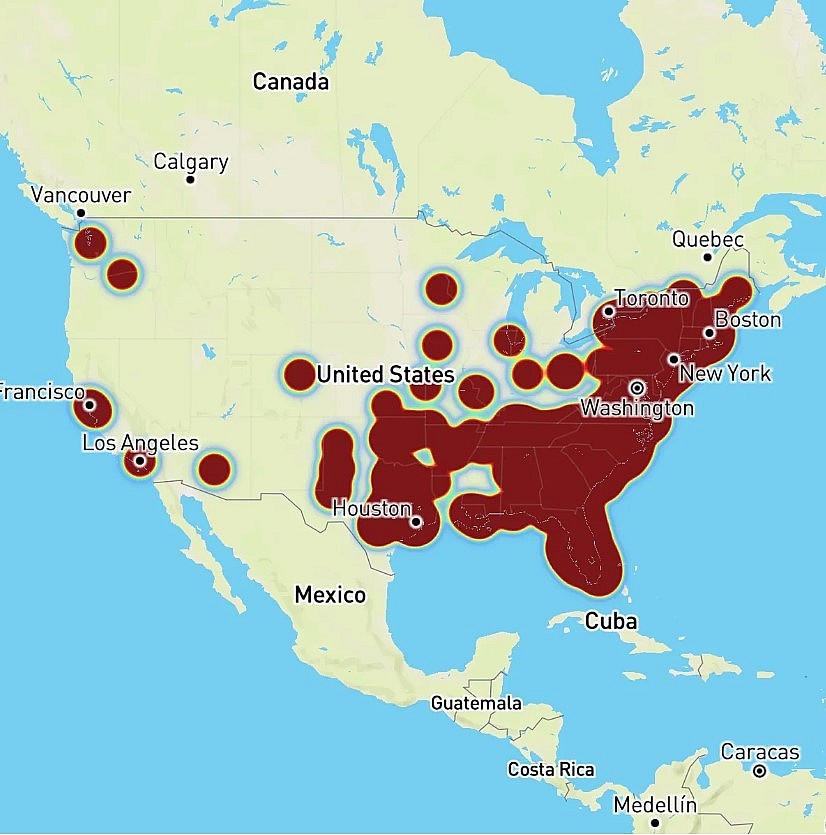
Data from Downdetector, which tracks real-time user reports, shows the Verizon outage is extensive and geographically widespread. The heaviest concentration of reports appears across the East Coast, including both the Northeast and Southeast, with significant disruption also reported in the Midwest. Isolated but notable outages have also been logged in major West Coast metropolitan areas, underscoring the national scale of the incident. |
Why 911 Might Not Work Normally During a Carrier Outage
Even under normal conditions, U.S. rules require that wireless providers transmit 911 calls even from phones that aren’t subscribed to a plan.
But “should work” and “will work in a real outage” aren’t always the same thing. Here’s why:
-
Your phone still needs a usable signal path. If Verizon towers or core network systems are down in a way that blocks access and alternative networks aren’t reachable, the call can fail.
-
Call-backs and location can be limited. The official 911.gov FAQ warns that when phones call 911 without active service, the 911 center may not be able to call back, and the caller’s location may not be delivered in the usual way.
-
Outage-related routing issues can hit emergency calling. During this event, officials in places like New York City and Washington, D.C. warned that the outage could affect some users’ ability to connect to 911 and advised alternatives.
What To Do If You Need Help and 911 Won’t Connect
If you try 911 and it doesn’t go through (or drops), use this quick checklist:
-
Try another phone immediately. Borrow a phone on a different carrier (AT&T, T-Mobile, etc.).
-
Use a landline if one is available (home, work, hotel front desk).
-
Go in person to the nearest police precinct, fire station, or other public safety location if it’s safe to do so.
-
Stay on the line if you reach dispatch. Local guidance in Connecticut urged callers to remain connected and not “test” 911.
If you have an iPhone with Emergency SOS via Satellite
Apple says you should try calling 911 first. If the call won’t connect, the iPhone can offer Emergency Text via Satellite (where supported) so you can message emergency services.
This can be a lifesaver in the right conditions, but it’s not available everywhere and isn’t a replacement for normal cellular 911 in every situation.
Why This Outage Drew Extra Attention
The Jan. 14 outage wasn’t just annoying; it raised public-safety concerns. At its peak, outage trackers showed well over 175,000 reports (and in some tallies, more) and multiple cities issued emergency guidance.
The FCC said it would investigate the disruption and take appropriate action, reflecting how seriously regulators treat failures that could interfere with emergency communications.
Quick Preparedness Tips for Future Outages
You don’t need to panic-buy gear to be ready. A few small habits help a lot:
-
Save key addresses offline (home, school, work) so you can give location info without relying on maps/data.
-
Enable Wi-Fi Calling ahead of time (when your carrier supports it) so you can call over Wi-Fi during cellular trouble.
-
Keep one backup contact method: a charged power bank, a cheap prepaid SIM on another carrier, or access to a landline at a neighbor’s/home office.
-
Know your local non-emergency number for police/fire when appropriate (but use 911 for emergencies).
Where to Check Status and Get Help
Verizon typically directs customers to its network status/outage tools and support channels while engineers work to restore service.
If you’re reporting an urgent issue and can’t reach Verizon by phone due to the outage, use web-based support tools (when you have Wi-Fi) and monitor alerts from local emergency management agencies.