How to Watch Coachella 2026 Live From Home: Stream Guide, Schedule, and Best Tips

If you’re not making the trip to Indio this year, the good news is you’re not locked out of the fun. Coachella 2026 is once again streaming live on YouTube, and honestly, watching from home has become its own version of the festival. You skip the traffic, avoid the desert exhaustion, keep your own bathroom, and still get a front-row look at one of the biggest music weekends of the year. The festival runs across two weekends, April 10 to 12 and April 17 to 19, with the official livestream available on YouTube for both.
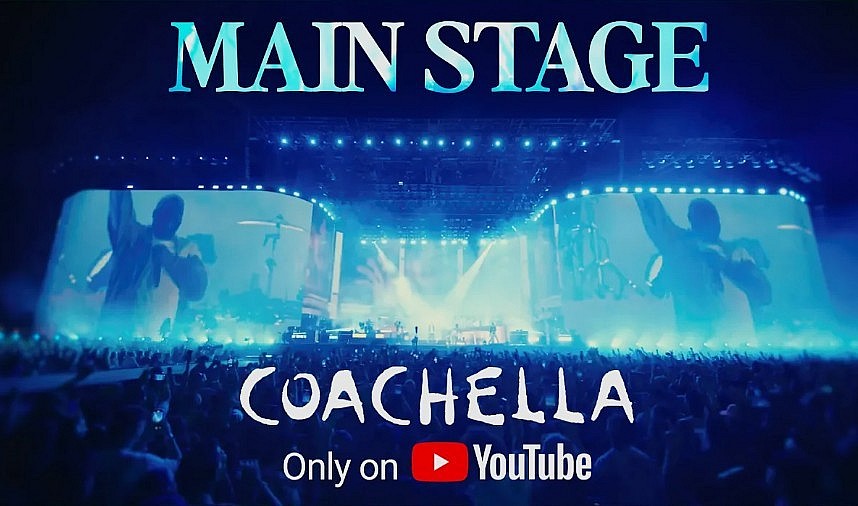
The setup this year is more polished than the old “catch whatever clip goes viral later” routine. Coachella’s official YouTube livestream includes seven live stage feeds, and the festival’s own livestream page says fans can watch performances from April 10 to 12 and again from April 17 to 19 on the official Coachella YouTube channel. The stages streaming live are the Coachella main stage, Sahara, Outdoor Theatre, Mojave, Gobi, Sonora, and Quasar.
For anyone trying to plan the weekend well, the first thing to know is this: start with the official schedule, not social media guesses. Coachella’s schedule page is the best place to check who is playing and when, and the festival also notes that set times can shift between Weekend 1 and Weekend 2. That matters more than people think. One small change is all it takes to miss the act you were actually waiting for
Read more: Who Is Performing at Coachella 2026 and When? Full Set Times for Weekend 1
 |
| How to Watch Coachella 2026 Live: Dates, Set Times, Streaming |
Where to watch the Coachella 2026 livestream
The simplest answer is also the right one: watch on the official Coachella YouTube channel. Coachella’s livestream page directs viewers there, and YouTube already has the stage streams scheduled. The festival’s YouTube presence is built for live viewing, so you do not need a paid subscription just to tune in. Several reports this week also describe the stream as free to watch.
If you want the most straightforward experience, use a TV with the YouTube app. Festival streams are fun on a phone for a few minutes, but they feel much bigger on a proper screen, especially once the headliners come on and the production opens up. If you’re watching with friends, TV is the way to go. If you’re watching solo and hopping between artists, desktop can actually be better.
What time does the Coachella livestream start?
The official Coachella YouTube playlist says the 2026 livestream starts April 10 at 4 p.m. Pacific Time, and reports about the stream say both weekends begin at 4 p.m. PT / 7 p.m. ET. For viewers outside the United States, that is exactly why the schedule matters: the Livestream App can sync the schedule to your time zone, which is one of the more genuinely useful features this year.
That last point is easy to underestimate. Coachella is a late-day festival in California, so depending on where you live, some of the biggest sets may land at awkward hours. If you are watching from Asia or Europe, a little planning goes a long way. The app handles that better than mental math at 1 a.m.
How to choose the right stage stream
This is where home viewing gets a little strategic. Coachella is not one single livestream with everyone appearing in order. It’s a multi-stage event, and you need to match the artist you want with the stage feed carrying that performance. The official livestream setup covers seven stages, so the best method is simple: check the schedule, identify your artist’s stage and time, then open the correct YouTube feed a few minutes early.
My advice: do not wait until the exact minute a set begins. Open the stream five to ten minutes early. Festival schedules can slide, transitions can run long, and half the frustration of livestream weekends comes from scrambling when a performance has already started.
Read more: What is Coachella: History, Highlights, and Special Events in 2026
Use Multiview if you hate missing conflicting sets
This might be the best feature for serious viewers. Coachella’s official livestream page says YouTube’s Multiview lets you watch up to four live stages at once on your TV, and you can switch audio between feeds. That is especially useful at Coachella, where schedule conflicts are part of the experience every single year.
And yes, the conflicts are real this weekend. Entertainment Weekly’s rundown of Weekend 1 notes overlaps such as Disclosure and Ethel Cain both at 10:35 p.m. Friday, the Strokes and David Guetta both at 9 p.m. Saturday, and Laufey at 8:40 p.m. with FKA twigs at 8:45 p.m. Sunday. If you are watching from home, Multiview is probably the closest thing to beating the festival’s scheduling chaos.
Personally, this is where staying home actually wins. At the real festival, you still have to walk, weave through crowds, and make peace with missing half of something. On your couch, at least you can keep multiple stages in view and make a calmer decision.
Don’t ignore Coachella TV
 |
| Coachella TV |
If you want more than the straight stage feeds, Coachella TV is worth keeping open in another tab. Entertainment Weekly says it is a 24-hour interactive experience featuring a mix of past performances and 2026 festival highlights, while reporting this month describes it as a round-the-clock stream built to keep viewers inside the festival universe even between major live sets.
This is especially handy if you are joining late, stepping away for dinner, or just not in the mood to babysit the schedule every minute. A lot of people think festival streaming means constant decision fatigue. Coachella TV softens that. You can leave it running and still feel like you’re part of the weekend.
Should you download the Coachella Livestream App?
Yes, especially if you plan to watch more than two or three sets.
The official Coachella livestream page says the app can show the full livestream and replay schedule in your local time zone, let you build a personal viewing schedule, set reminders, watch highlights on demand, shop livestream-exclusive merchandise, and keep up with the latest festival news. That is a surprisingly complete toolkit for home viewers.
The biggest practical benefit is reminders. Everyone thinks they will remember that one set they care about. Then they get distracted, open another stream, or start scrolling, and suddenly the performance is halfway over. The reminder feature solves a very human problem.
Read more: 10 Biggest Events in California for April 2026: Music, Food, And Arts Festivals
Are there replays and highlights?
Coachella says the Livestream App includes access to highlights on demand, and its official page also references a full livestream and replay schedule. In other words, even if you miss part of the weekend live, there are still ways to catch key moments afterward.
That said, I still wouldn’t rely too heavily on “I’ll watch it later.” The performances people talk about most tend to hit differently in the moment, especially when the internet is reacting in real time. A replay is useful. It is not quite the same thing.
What’s new with the Coachella 2026 stream?
This year’s at-home experience looks more ambitious than a standard festival simulcast. Reporting this month says the Coachella Stage, Outdoor Theatre, and Sahara are streaming in 4K for the first time, while Quasar is offering both horizontal and vertical video feeds. The same reporting says creator-led Watch With streams are returning, and YouTube Shopping is once again part of the experience.
Coachella’s official livestream page also highlights Watch With, where creators add commentary and reactions on their own channels, plus shopping features that let viewers buy official festival and artist merchandise directly from the livestream.
Not everyone needs those extras, but they do make the whole thing feel less passive. Watching a festival at home can drift into background noise if you are not careful. Features like Multiview, reminders, and curated side streams help keep it engaging.
Best way to watch Coachella from home this weekend
If I were setting up a genuinely good home-viewing plan, I’d do it like this.
Start with the official schedule and mark the five or six sets you absolutely care about. Then download the Coachella Livestream App so the times convert correctly and reminders are in place. If you have access to a smart TV, use the YouTube app there for the biggest sets, and use a laptop or phone as a backup screen for checking another stage. During the heavy conflict windows, switch to Multiview. And when you want something less intense between headline moments, leave Coachella TV running.
It sounds simple because it is simple. The mistake most people make is treating a livestreamed festival like a normal concert. It is not. It is closer to sports viewing: the better your setup, the more fun you have.
A few practical viewing tips that actually help
One, keep the official schedule open the whole weekend. Set times can move, and Weekend 2 may not mirror Weekend 1 perfectly.
Two, choose your “non-negotiable” artists before the day starts. Coachella is full of overlaps. If you make every decision in the moment, you’ll spend half the night hesitating.
Three, use the biggest screen in your house for headliners. Pop and dance sets usually reward scale. It really does make a difference.
Four, don’t chase every viral clip. Some of the best festival moments are the sets you did not plan for. The app’s discovery tools and Coachella TV are useful for that reason.
And five, remember that watching from home is supposed to be fun, not homework. You are not failing the festival if you miss an hour here or there.
Final thoughts
Coachella from home used to feel like a consolation prize. In 2026, it doesn’t. Between the seven stage streams, the official schedule tools, the Livestream App, Multiview on TV, and the always-on Coachella TV feed, the at-home experience is now built for people who genuinely want to follow the festival closely, not just peek in between social posts.
Honestly, there is something satisfying about doing Coachella this way. You get the music, the chatter, the surprise guest potential, the late-night set-hopping, and none of the sunburn. That is not the same as being there, of course. But it is a pretty good argument for staying on the couch.