How to Find 'Join for Free' on Patreon in 2026 (Even When It’s Hidden)

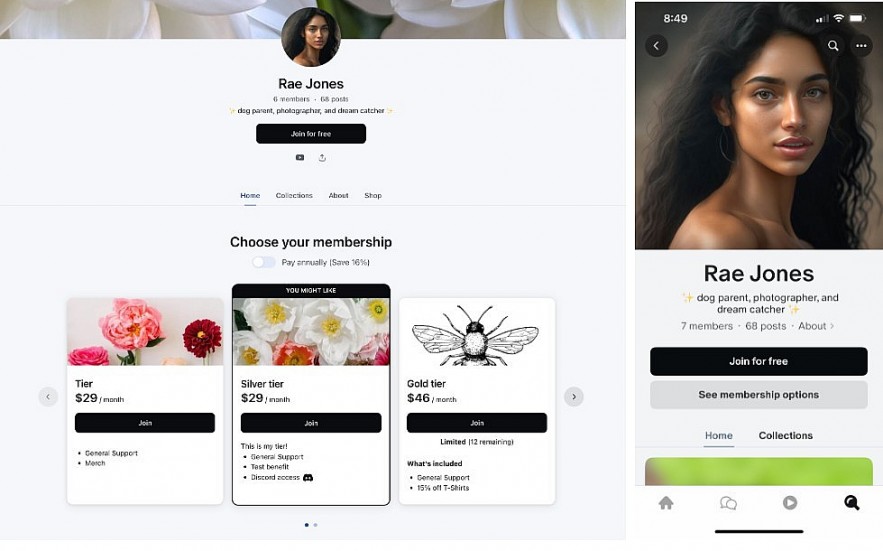 |
| You can decide how your free option appears to visitors to your Patreon |
Patreon’s Free Membership lets you follow a creator and get eligible updates without paying. Patreon documents the basics in its Help Center (“Becoming a free member”): https://support.patreon.com/hc/en-us/articles/15491075190669-Becoming-a-free-member
So why do so many people search “Join for free not showing”? Because Patreon’s interface varies by device, layout updates, and creator settings. Here’s how to reliably find it.
Step 1: Use the Creator’s Page the “Right” Way (Web First)
If you’re stuck, start with a desktop browser (or mobile browser, not the app). Patreon’s newer page layouts can show different elements depending on where you land (Home vs Posts). Patreon explains these layout differences here:
https://support.patreon.com/hc/en-us/articles/35673185532941-Why-does-this-creator-s-page-look-different
Do this:
-
Open the creator’s Patreon page.
-
If you don’t see “Join for free” on the Home tab, open the Posts tab (some views hide options until you switch tabs).
-
Look near the membership options area.
Read more: What Is a Patreon Viewer Tool, And Legit Alternatives
Step 2: Check the “…” (More Options) Menu
This is the #1 “hidden” location. Patreon notes that creators can choose how prominently free vs paid options appear, and in some cases the free option may not be front-and-center. See “How free memberships can help grow your community”:
https://support.patreon.com/hc/en-us/articles/16433886029325-How-free-memberships-can-help-grow-your-community
Where to look: near the top of the creator page (often close to the banner area), tap “…” and scan for Join for free.
Read more: How to Join Patreon Free: Latest Guide to Free Membership Explained
Step 3: Understand the Most Common Reason It’s Missing
Sometimes, it’s not your device. It’s the creator’s settings.
Patreon’s “Get started on Patreon” article describes Free membership visibility settings, including options like showing free + paid together or emphasizing paid options. If a creator chooses “paid options only,” you may not see a big “Join for free” call-to-action.
https://support.patreon.com/hc/en-us/articles/16263061573645-Get-started-on-Patreon
What you can do:
-
Try the “…” menu again.
-
Try the desktop browser view.
-
If it still doesn’t exist, assume the creator simply isn’t offering free membership prominently (or at all).
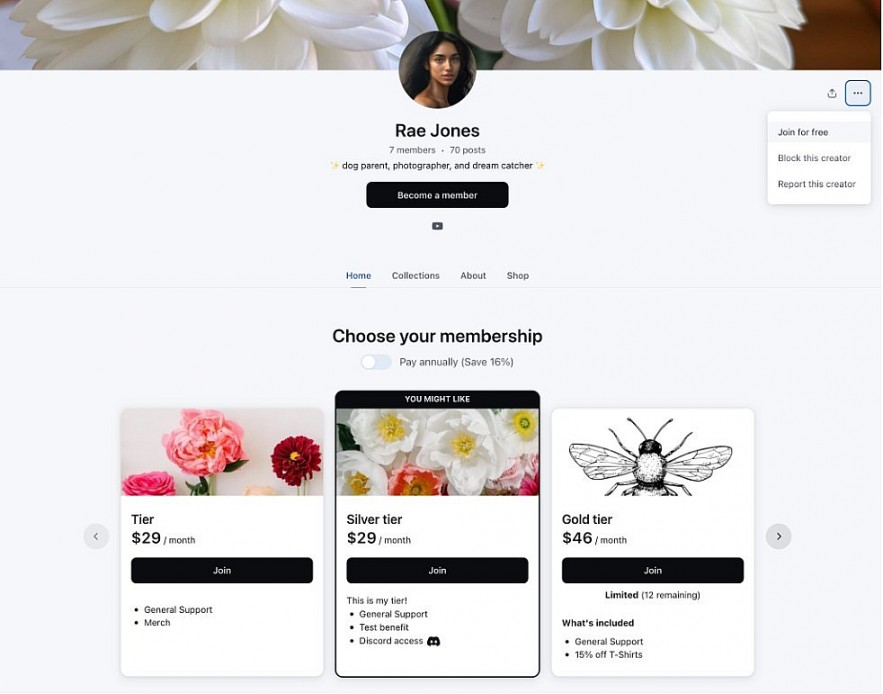 |
| If your Patreon is suitable for all audiences, you can change your Page settings to show paid options only |
Step 4: Fix “Join for Free” Not Showing (Quick Troubleshooting)
Use this checklist in order:
A) You’re using the app and options look limited
Switch to a browser (desktop or mobile). Many membership-related UI elements are clearer on web.
B) You’re not logged in
When you click Join for free, Patreon may ask you to sign in first. Log in and re-check the button.
C) You’re already a member (paid or free)
If you already joined, the button may be replaced by “Membership” or “Manage.” Check your membership status in your account.
D) You’re landing on a page section that doesn’t surface membership options
Switch from Home to Posts (or vice versa). Patreon confirms you can navigate between views when pages look different:
https://support.patreon.com/hc/en-us/articles/35673185532941-Why-does-this-creator-s-page-look-different
Step 5: Confirm You Joined as “Free” (Not a Trial)
A common mistake: people click into a tier and accidentally start a flow that looks “free” (like a promo) but is actually a trial or paid checkout.
Rule of thumb:
-
If Patreon asks for payment details, you are not joining free membership.
For what free membership includes and how upgrades work, use Patreon’s official guide:
https://support.patreon.com/hc/en-us/articles/15491075190669-Becoming-a-free-member
Read more: How to Watch or Read Patreon for Free in 2026: Legit Methods, Steps, and Safety Warnings
Practical Advice
-
Join free first, then decide. Free membership is the safest way to follow updates and see what the creator shares publicly or to free members.
-
Avoid “viewer tools.” Sites claiming they unlock paid Patreon content are often scams or policy-violating. Stick to official options.
Bottom Line
In 2026, “Join for free” is real—but it can be less visible depending on layout and creator settings. Your best success path is: browser view → check Posts tab → open the “…” menu → confirm you joined as Free.
FAQs
Why can’t I see “Join for Free” on some Patreon pages?
There are three common reasons:
-
The creator may not offer free membership at all.
-
The creator has chosen to prioritize paid tiers visually, so the free option appears under the “…” (More options) menu.
-
You’re viewing the page inside the mobile app, where some membership options appear differently.
If you can’t find it, try switching to a desktop browser and checking both the Home and Posts tabs.
Is “Join for Free” available on every Patreon creator page?
No. Free membership is optional. Creators can enable or disable it, and they can choose how prominently it appears. If you don’t see it anywhere (including the “…” menu), the creator likely hasn’t enabled free membership.
Do I need to enter payment details to join Patreon for free?
No. Free membership does not require payment information.
If Patreon asks for your credit card or payment method, you are likely starting a paid tier or a free trial, not joining as a free member.
Can I switch from paid membership to free membership?
In many cases, yes. When you cancel a paid membership, Patreon may offer the option to remain as a free member instead of fully leaving the creator’s community. This depends on the creator’s settings.
How do I confirm I joined as a free member?
After joining, check:
-
Your membership status under the creator’s page
-
Your account membership section
-
Whether the interface shows “Free Member” instead of a paid tier
If no payment information was entered and no billing date is shown, you are likely a free member.